Packaging a 3rd Party App
-
This tutorial will show you how to package an existing app in the NASOS SDK
-
We will focus on the Transmission torrent app
-
Since this app is already packaged in most Linux distributions, we’ll use the Ubuntu container and its transmission package
Note
You can download the full source code for this tutorial
Project File
Create the project using:
mkdir -p ~/Projects/transmission
echo -e "com.transmissionbt.transmission\n1.0\ncom.ubuntu.trusty-lamp-1.0" | sudo rainbow --init ~/Projects/transmission/
sudo chown -R rainbow:rainbow ~/Projects/transmission
Edit ~/Projects/transmission/package.json so it contains:
{
    "type": "application",
    "id": "com.transmissionbt.transmission",
    "version": "1.0",
    "depends": [
        "com.ubuntu.trusty-lamp-1.0"
    ],
    "network_ports": {
        "WEB_UI": 9091,
        "TORRENT": 51413
    },
    "redirect_mode": "custom"
}
-
As mentioned above, we’ll use the
com.ubuntu.trusty-lamp-1.0since we want to use its transmission package. -
We also declare the main
WEB_UIport and a dedicatedTORRENTport for transmission. -
Finally, we use the
customredirect_mode because transmission doesn’t behave well behind a reverse proxy.
Transmission Configuration
The Ubuntu transmission package comes preconfigured, but we need to make a few changes.
The first one we want to change is the /etc/default/transmisison-daemon file.
Create the following directory:
mkdir -p ~/Projects/transmission/source/etc/default
Then create the ~/Projects/transmission/source/etc/default/transmission-daemon
file with the following content:
# defaults for transmission-daemon
# sourced by /etc/init.d/transmission-daemon

# Change to 0 to disable daemon
ENABLE_DAEMON=1

# This directory stores some runtime information, like torrent files
# and links to the config file, which itself can be found in
# /etc/transmission-daemon/settings.json
CONFIG_DIR="/var/lib/transmission-daemon/info"

# Default options foe daemon, see transmission-daemon(1) for more options
PIDFILE="/var/run/transmission-daemon/transmission-daemon.pid"
OPTIONS="--config-dir $CONFIG_DIR --pid-file $PIDFILE"

# (optional) extra options to start-stop-daemon
#START_STOP_OPTIONS="--iosched idle --nicelevel 10"
This file adds the --pid-file option to transmission’s startup, as shown
by this diff with the file originally packaged by Ubuntu :
--- build/x86_64/chroot/.rw/etc/default/transmission-daemon 2013-07-27 21:34:44.000000000 +0200
+++ source/etc/default/transmission-daemon  2015-09-16 14:54:57.844898107 +0200
@@ -9,8 +9,9 @@
 # /etc/transmission-daemon/settings.json
 CONFIG_DIR="/var/lib/transmission-daemon/info"

-# Default options for daemon, see transmission-daemon(1) for more options
-OPTIONS="--config-dir $CONFIG_DIR"
+# Default options foe daemon, see transmission-daemon(1) for more options
+PIDFILE="/var/run/transmission-daemon/transmission-daemon.pid"
+OPTIONS="--config-dir $CONFIG_DIR --pid-file $PIDFILE"

 # (optional) extra options to start-stop-daemon
 #START_STOP_OPTIONS="--iosched idle --nicelevel 10"
The second file we need to modify is /etc/init.d/transmission-daemon. Create
the following directory:
mkdir -p ~/Projects/transmission/source/etc/init.d
Then create the ~/Projects/transmission/source/etc/init.d/transmission-daemon
file with the following content:
#!/bin/sh -e
### BEGIN INIT INFO
# Provides:          transmission-daemon
# Required-Start:    $local_fs $remote_fs $network
# Required-Stop:     $local_fs $remote_fs $network
# Default-Start:     2 3 4 5
# Default-Stop:      0 1 6
# Short-Description: Start or stop the transmission-daemon.
### END INIT INFO

NAME=transmission-daemon
DAEMON=/usr/bin/$NAME
USER=rainbow
STOP_TIMEOUT=30

export PATH="${PATH:+$PATH:}/sbin"

[ -x $DAEMON ] || exit 0

[ -e /etc/default/$NAME ] && . /etc/default/$NAME

. /lib/lsb/init-functions

start_daemon () {
    if [ $ENABLE_DAEMON != 1 ]; then
        log_progress_msg "(disabled)"
        log_end_msg 255 || true
    else
        start-stop-daemon --start \
        --chuid $USER \
        $START_STOP_OPTIONS \
        --startas $DAEMON --pidfile $PIDFILE -- $OPTIONS || log_end_msg $?
        log_end_msg 0
    fi
}

case "$1" in
    start)
        log_daemon_msg "Starting bittorrent daemon" "$NAME"
        start_daemon
        ;;
    stop)
        log_daemon_msg "Stopping bittorrent daemon" "$NAME"
        start-stop-daemon --stop --quiet \
            --pidfile $PIDFILE --retry $STOP_TIMEOUT \
            --oknodo || log_end_msg $?
        log_end_msg 0
        ;;
    reload)
        log_daemon_msg "Reloading bittorrent daemon" "$NAME"
        start-stop-daemon --stop --quiet \
            --exec $DAEMON \
            --oknodo --signal 1 || log_end_msg $?
        log_end_msg 0
        ;;
    restart|force-reload)
        log_daemon_msg "Restarting bittorrent daemon" "$NAME"
        start-stop-daemon --stop --quiet \
            --exec $DAEMON --retry $STOP_TIMEOUT \
            --oknodo || log_end_msg $?
        start_daemon
        ;;
    status)
        status_of_proc "$DAEMON" "$NAME" && exit 0 || exit $?
        ;;
    *)
        log_action_msg "Usage: /etc/init.d/$NAME {start|stop|reload|force-reload|restart|status}" || true
        exit 2
        ;;
esac

exit 0
It changes the runtime user to rainbow and adds the --pidfile handling to
start-stop-daemon, as the following diff shows:
--- build/x86_64/chroot/.rw/etc/init.d/transmission-daemon  2012-05-28 18:11:33.000000000 +0200
+++ source/etc/init.d/transmission-daemon   2015-09-16 15:13:45.912904953 +0200
@@ -10,7 +10,7 @@

 NAME=transmission-daemon
 DAEMON=/usr/bin/$NAME
-USER=debian-transmission
+USER=rainbow
 STOP_TIMEOUT=30

 export PATH="${PATH:+$PATH:}/sbin"
@@ -29,7 +29,7 @@
         start-stop-daemon --start \
         --chuid $USER \
        $START_STOP_OPTIONS \
-        --exec $DAEMON -- $OPTIONS || log_end_msg $?
+        --startas $DAEMON --pidfile $PIDFILE -- $OPTIONS || log_end_msg $?
        log_end_msg 0
     fi
 }
@@ -42,7 +42,7 @@
     stop)
         log_daemon_msg "Stopping bittorrent daemon" "$NAME"
         start-stop-daemon --stop --quiet \
-            --exec $DAEMON --retry $STOP_TIMEOUT \
+            --pidfile $PIDFILE --retry $STOP_TIMEOUT \
             --oknodo || log_end_msg $?
         log_end_msg 0
         ;;
Transmission Configuration Script
The configuration for the transmission app itself is stored in the
/etc/transmission-daemon/settings.json file. We will need to perform some
runtime modification to this file, for which we will need a tool allowing
making some changes to it.
Create the ~/Projects/transmission/scripts/config.py file with the following
content:
#!/usr/bin/python

import json
import sys

TRANSMISSION_SETTINGS = '/etc/transmission-daemon/settings.json'

if len(sys.argv) < 3:
    sys.exit(1)

with open(TRANSMISSION_SETTINGS, 'r') as settings_file:
    settings = json.load(settings_file)

if sys.argv[1] not in settings:
    sys.exit(1)

value_type = type(settings[sys.argv[1]])
settings[sys.argv[1]] = value_type(sys.argv[2])

with open(TRANSMISSION_SETTINGS, 'w') as settings_file:
    json.dump(settings, settings_file, indent=4)
This script can be used as follows to change some settings:
config.py <key> <value>
We’ll use in the the startup script to set some runtime settings.
For this to work, we need to modify the default settings.json. Create the
~/Projects/transmission/source/settings.json file with the following content:
{
    "blocklist-enabled": 0,
    "download-dir": "/shares/Public/",
    "download-limit": 100,
    "download-limit-enabled": 0,
    "encryption": 1,
    "max-peers-global": 200,
    "peer-port": 51413,
    "pex-enabled": 1,
    "port-forwarding-enabled": 0,
    "rpc-authentication-required": false,
    "rpc-password": "transmission",
    "rpc-port": 9091,
    "rpc-username": "transmission",
    "rpc-whitelist": "127.0.0.1",
    "rpc-whitelist-enabled": 0,
    "rpc-url": "/transmission/",
    "umask": 0,
    "upload-limit": 100,
    "upload-limit-enabled": 0
}
Build Script
Create the ~/Projects/transmission/build.sh file with the following content:
#!/bin/bash

# This is a trick to prevent transmission-daemon from starting after
# installation
/bin/echo -e '#!/bin/sh\nexit 101' > /usr/sbin/policy-rc.d
chmod +x /usr/sbin/policy-rc.d

# We need to update the ap-get database, since the container has a cleared one
apt-get update
# Here we need to make sure we disable interactive prompts and recommended packages
apt-get install -y -q --no-install-recommends transmission-daemon

# We can now remove this file
rm /usr/sbin/policy-rc.d

mkdir -p /var/run/transmission-daemon
chown debian-transmission:debian-transmission /var/run/transmission-daemon

install -m 755 /home/source/rc.local /etc
install -m 755 /home/source/settings.json /etc/transmission-daemon
install -m 755 /home/source/etc/default/transmission-daemon /etc/default
install -m 755 /home/source/etc/init.d/transmission-daemon /etc/init.d/

chown -R rainbow:root /etc/transmission-daemon
chown -R rainbow:root /var/lib/transmission-daemon
chown -R rainbow:root /run/transmission-daemon

exit 0
Note
We give ownership of the transmission directories to the rainbow user,
since we modified the package to run as rainbow instead of the
debian-transmission user.
Startup Script
Create the ~/Projects/transmission/source/rc.local file with the following content:
#!/bin/sh -e

python /scripts/config.py rpc-port $RAINBOW_PORT_WEB_UI
python /scripts/config.py peer-port $RAINBOW_PORT_TORRENT

/etc/init.d/transmission-daemon $1

exit 0
Note
Here, we use the config.py to take the port and path values into account.
Build the App
You can then build the app using:
sudo rainbow --build ~/Projects/transmission
sudo rainbow --pack ~/Projects/transmission
Then install it for testing:
sudo rainbow --install ~/Projects/transmission/build/x86_64/com.transmissionbt.transmission-1.0-x86_64.rbw
And check its URL:
sudo rainbow --list com.transmissionbt.transmission
Which should return something like:
-- com.transmissionbt.transmission: Transmission
    version                         : 1.0
    architecture                    : x86_64
    install_path                    : /opt/rainbow/transmission-01a49cc
    state                           : running
    blocking_state                  : not_blocked
    startup_mode                    : auto
    install_id                      : transmission-01a49cc
    public_key_hash                 : None
    nasos_min_version               : None
    nasos_max_version               : None
    url                             : http://10.0.2.15:9091/
    PIDS:
      \- 10989 : /usr/bin/transmission-daemon --config-dir /var/lib/transmission-daemon/info --pid-file /var/run/transmission-daemon/transmission-daemon.pid
    NETWORK PORTS:
      WEB_UI                        : 9091
      TORRENT                       : 51413
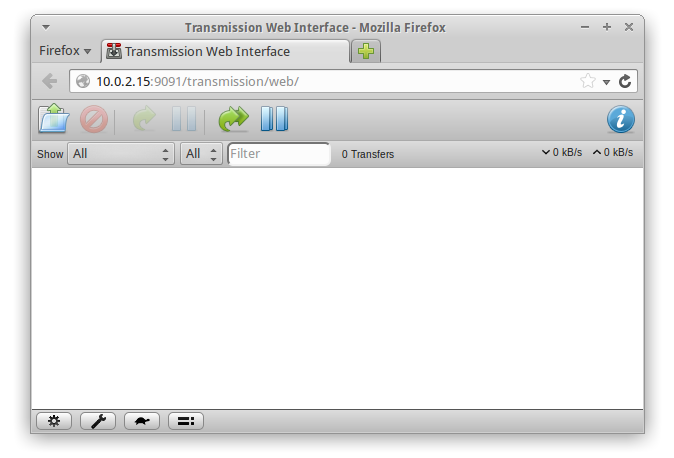
Open the http://10.0.2.15:9091/ in the browser, you should get: