Advanced PHP Webapp
-
This tutorial will teach you how to create an advanced web app using the NASOS SDK. This app will make use of the NAS API authentication mechanism
-
This app will be using the PHP language
-
The app will simply display a dynamic web page allowing to perform some demo NAS API requests on behalf of the currently logged in user
Note
You can download the full source code for this tutorial
Project File
Create the project using:
mkdir -p ~/Projects/webapp_php
echo -e "com.nasos.webapp_php\n1.0\norg.debian.wheezy-lamp-1.2,com.nasos.unicorn_api-7.0.0" | sudo rainbow --init ~/Projects/webapp_php/
sudo chown -R rainbow:rainbow ~/Projects/webapp_php
Edit ~/Projects/webapp_php/package.json so it contains:
{
    "type": "application",
    "id": "com.nasos.webapp_php",
    "version": "1.0",
    "depends": [
        "org.debian.wheezy-lamp-1.2",
        "com.nasos.unicorn_api-7.0.0"
    ],
    "network_ports": {
        "WEB_UI": 8080
    }
}
As can be seen, we will use the org.debian.wheezy-lamp-1.2, since we need
Python, and we declare the port 8080 for our WEB_UI.
We also depend on the nasos.unicorn_api-7.0.0 package, since we’ll use the
NAS API.
API Configuration file
Create the source directory:
mkdir -p ~/Projects/webapp_php/source
Create the ~/Projects/webapp_php/source/unicorn_api.conf file with the
following content:
{
    "mandatory_perms": [
        "v7.0.nas_authentication.NasAuth",
        "v7.0.system.System"
    ]
}
This means we’ll be using the v7.0.nas_authentication.NasAuth and
v7.0.system.System NAS API capabilities.
App Source Code
The app is composed of 2 PHP scripts. First we need to create the source directory:
mkdir -p ~/Projects/webapp_php/source/www
Then create the ~/Projects/webapp_php/source/www/index.php, the main script
for the app, with the following content:
<?php
session_start();
include 'seagate_sdk_helper.php';

$config = nasos_api_get_config("/etc/unicorn_api.conf");
$action = isset($_GET["action"]) ? $_GET["action"] : null;

$info_system = array(
    "get_infos" => "NAS infos",
    "get_branding_info" => "Branding infos",
    "get_date" => "Current NAS date",
    "get_timezone" => "NAS timezone",
    "get_ntp_info" => "NTP infos"
);

// We come from the login page ?
if (isset($_GET['app_user_status'])) {
    if ($_GET['app_user_status'] != 1) {
        if (isset($_GET['error_id']) and isset($_GET['error_text'])) {
            die($_GET['error_id'] . " : " . $_GET['error_text']);
        } else {
            die("Error during authentication !");
        }
    } elseif (isset($_GET['app_user_token'])) {
        $_SESSION['app_user_token'] = $_GET['app_user_token'];
    }
}

if ($action == "login" and !isset($_SESSION['nasos_user'])) {
    // Get the token session if necessary
    if (!isset($_SESSION['app_session_token'])) {
        list($error, $_SESSION['app_session_token']) =
            nasos_open_session($config['nas_ip'], $config["install_id"], $config['token']);
        if (isset($error)) {
            die($error);
        }
    }
    // Call the login page if necessary
    if (!isset($_SESSION['app_user_token'])) {
        $login_url =
            "/?app_session_token=" . $_SESSION['app_session_token'] .
            "&app_path=" . $config['path'] . "?action=login";
        header("Location: $login_url");
        die();
    }
    // Call the adequate method to get the current user
    $input = array();
    $url = "http://" . $config["nas_ip"] . "/api/external/7.0/nas_authentication.NasAuth.mySelf";
    $user = nasos_external_api($url, $input, $_SESSION['app_session_token'], $_SESSION['app_user_token']);
    if (isset($user)) {
        $_SESSION['nasos_user'] = $user['myself']['__properties__'];
    }
}

if ($action == "logout" and isset($_SESSION['app_user_token'])) {
        $logout_url =
            "/?logout=anonyme&app_session_token=" . $_SESSION['app_session_token'] .
            "&app_path=" . $config['path'];
        session_destroy();
        // Call the logout page
        header("Location: $logout_url");
        die();
}
?>
<html>
    <body>
        <pre>
<?php print_r($_SESSION); ?>
        </pre>
<?php if (isset($_SESSION['nasos_user'])) { ?>
        <form>
            Hello <?=$_SESSION['nasos_user']['login']?>
            <input type="submit" name="action" value="logout">
        </form>
<?php   } else { ?>
        <form>
            Not logged
            <input type="submit" name="action" value="login">
        </form>
<?php   } ?>
        <form>
            <select name="select" id="system">
<?php
            foreach ($info_system as $method => $desc) {
                $selected = (isset($_GET['select']) and $_GET['select'] == $method) ? " selected" : "";
?>
                <option value="<?=$method?>"<?=$selected?>><?=$desc?></option>
<?php } ?>
            </select>
            <input type="submit" name="action" value="get">
        </form>
<?php
    if (isset($_GET['select'])) {
        $input = array();
        $url = "http://" . $config["nas_ip"] . "/api/external/7.0/system.System." . $_GET['select'];
        $result = nasos_external_api($url, $input, $_SESSION['app_session_token'], $_SESSION['app_user_token']);
?>
<?php if (isset($result)) { ?>
        <pre><?php print_r($result); ?></pre>
<?php } else { ?>
        Unable to get the infos! Need to login ?
<?php } ?>
<?php
    }
?>
    </body>
</html>
Then create the ~/Projects/webapp_php/source/www/seagate_sdk_helper.php file,
which is a library that can be reused for Apps that needs access to the NAS OS
backend, with the following content:
<?php

/*
 * Read App's informations registred with the helpers
 * Input:
 *   $file : the config file
 * Output:
 *   All the config in an associative array
 */
function nasos_api_get_config($file) {
    $unicorn_api_config = file_get_contents($file);
    $config = json_decode($unicorn_api_config, true);
    return $config;
}


/*
 * Make an HTTP request
 * Input:
 *   $url : the URL
 *   $opts : the context in a associative array
 * Output:
 *   The result of the HTTP request or null in case of error
 */
function http_request($url, $opts) {
    $context = stream_context_create($opts);
    $fp = fopen($url, 'r', false, $context);
    if ($fp) {
        $datas = stream_get_contents($fp);
        fclose($fp);
        return $datas;
    } else {
        return null;
    }
}


/*
 * Call the NASOS external API
 * Input:
 *   $url : URL with the NAS IP, the service and the method
 *   $input : an associative array with the API parameters
 *   $session_token : an optional token for method that needs App's authentication
 *   $user_token : an optional token for method that needs user's authentication
 * Output:
 *   An associative array with the result or null in case of error
 */
function nasos_external_api($url, $input, $session_token = null, $user_token = null) {
    $content = json_encode($input, JSON_FORCE_OBJECT);
    $opts = array(
        "http" => array(
            "method"  => "POST",
            "content" => $content,
            "header"  => "Content-Type: text/json\r\n" .
                         "Content-length: " . strlen($content) . "\r\n"
        )
    );
    if (isset($session_token)) {
        $opts["http"]["header"] .=
            "Authentication: APP_AUTH " . $session_token . "\r\n";
        if (isset($user_token)) {
            $opts["http"]["header"] .=
                "APP_USER: " . $user_token . "\r\n";
        }
    }
    $output = http_request($url, $opts);
    if (!isset($output)) {
        return null;
    }
    return json_decode($output, true);
}

/*
 * Open a new or existing session for an App
 * Input:
 *   $nas_ip : the IP of the NAS
 *   $app_id : the id of the App
 *   $app_token : the token of the registered application
 * Output:
 *   The error message or null if there is no error
 *   The token of the session or null in case of error
*/
function nasos_open_session($nas_ip, $app_id, $app_token) {
    $url = "http://$nas_ip/api/external/authenticate/app_login";

    // Get the challenge
    $opts = array(
        "http" => array(
            "ignore_errors" => 1,
            "method"        => "GET"
        )
    );
    $datas = http_request($url, $opts);
    if (!isset($datas)) {
        return array("$url : request failed !", null);
    }
    $challenge = json_decode($datas, true);

    // Now that we have the challenge we get our token
    $input = array(
        "app_id" => $app_id,
        "challenge_id" => $challenge['challenge_id'],
        "secret" => sha1($challenge['challenge'] . $app_token)
    );
    $session = nasos_external_api($url, $input);
    if (!isset($session)) {
        return array("$url : challenge failed !", null);
    }

    return array(null, $session['session_token']);
}

?>
Install Scripts
Edit the ~/Projects/webapp_php/scripts/post-install script so it contains:
#!/bin/sh
/usr/bin/unicorn_helper --register
# Remove the index.html provided by the container
rm /var/www/index.html
exit 0
Edit the ~/Projects/webapp_php/scripts/pre-remove script so it contains:
#!/bin/sh
/usr/bin/unicorn_helper --unregister
exit 0
Apache Configuration Templates
We need template for the apache configuration, since it will be the web server for the app.
Create the ~/Projects/webapp_php/source/ports.conf.apache_template file with
the following content:
NameVirtualHost *
Listen 127.0.0.1:{RAINBOW_PORT_WEB_UI}
<IfModule mod_ssl.c>
    Listen 443
</IfModule>
<IfModule mod_gnutls.c>
    Listen 443
</IfModule>
Create the ~/Projects/webapp_php/source/default.apache_template file with
the following content:
Alias {RAINBOW_WEB_PATH} /var/www
<VirtualHost *>
        ServerAdmin webmaster@localhost

        DocumentRoot /var/www
        <Directory />
                Options FollowSymLinks
                AllowOverride None
        </Directory>
        <Directory /var/www/>
                Options Indexes FollowSymLinks MultiViews
                AllowOverride None
                Order allow,deny
                allow from all
        </Directory>

        ScriptAlias /cgi-bin/ /usr/lib/cgi-bin/
        <Directory "/usr/lib/cgi-bin">
                AllowOverride None
                Options +ExecCGI -MultiViews +SymLinksIfOwnerMatch
                Order allow,deny
                Allow from all
        </Directory>

        ErrorLog ${APACHE_LOG_DIR}/error.log

        # Possible values include: debug, info, notice, warn, error, crit,
        # alert, emerg.
        LogLevel warn

        CustomLog ${APACHE_LOG_DIR}/access.log combined
</VirtualHost>
Startup Script
Create the ~/Projects/webapp_php/source/rc.local file with the following
content:
#!/bin/sh -e
#
# rc.local
#

# Update config files with NASOS informations
APACHE_TEMPLATE_DEFAULT_SITE="/etc/default.apache_template"
APACHE_TEMPLATE_PORTS_CONF="/etc/ports.conf.apache_template"

sed "s,{RAINBOW_WEB_PATH},$RAINBOW_WEB_PATH,g" $APACHE_TEMPLATE_DEFAULT_SITE > /etc/apache2/sites-available/default
sed "s/{RAINBOW_PORT_WEB_UI}/$RAINBOW_PORT_WEB_UI/g" $APACHE_TEMPLATE_PORTS_CONF > /etc/apache2/ports.conf


service apache2 $1

exit 0
Build Script
Create the ~/Projects/webapp_php/build.sh file with the following content:
#!/bin/bash

install -m 755 /home/source/rc.local /etc
install -m 644 /home/source/default.apache_template /etc/default.apache_template
install -m 644 /home/source/ports.conf.apache_template /etc/ports.conf.apache_template
install -m 644 /home/source/unicorn_api.conf /etc/unicorn_api.conf
rm -rf /var/www/*
cp -r /home/source/www/* /var/www/

exit 0
Build the App
You can then build the app using:
sudo rainbow --build ~/Projects/webapp_php
sudo rainbow --pack ~/Projects/webapp_php
Then .rbw package is available in:
~/Projects/webapp_php/build/x86_64/com.nasos.webapp_php-1.0-x86_64.rbw
The app cannot be tested inside the NASOS SDK VM, since it uses the NAS API. This means it needs to be installed on an actual NAS for testing. Please refer to the Debugging you App for details.
You will need to install the app and its dependencies on a NAS device, get the app’s URL and open it in a web browser.
You should get something like:
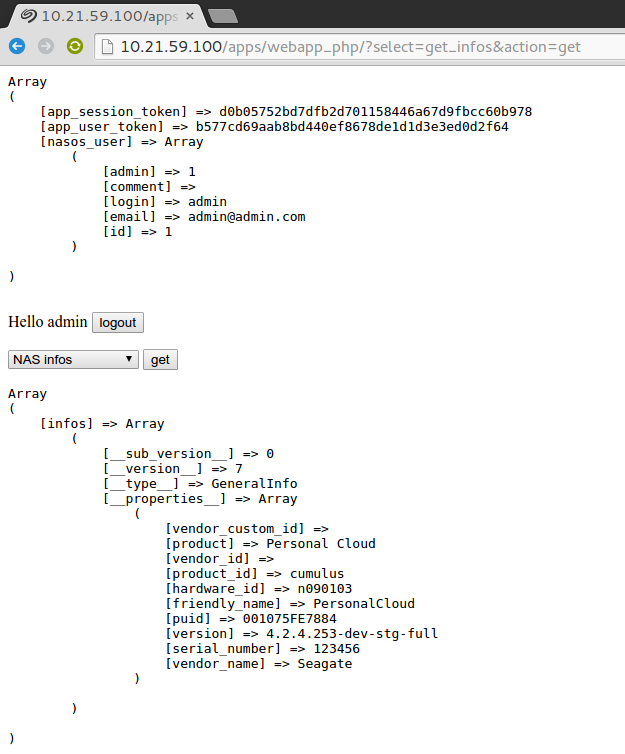
As can be seen, the app allows login in and out, and performing some API calls.